# Lab 2-2: EC2 Web Server

### When making VM:

When making VM make sure 80 and 443 are available to your ip in the security group you make.

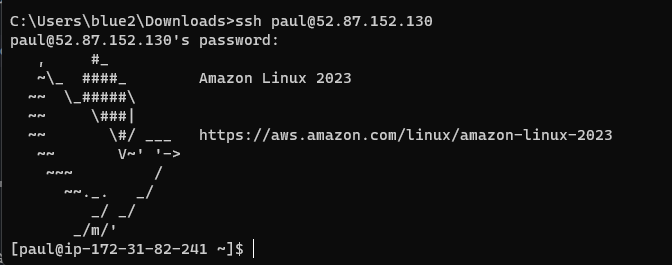
**Submit: Screenshot of successful SSH connection to instance**

### Install httpd

```
sudo yum install httpd
sudo systemctl start httpd
```

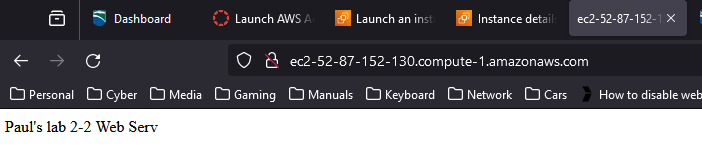
**Submit: Screenshot of successful connection to web service from your workstation browser**

<figure><img src="https://1702353884-files.gitbook.io/~/files/v0/b/gitbook-x-prod.appspot.com/o/spaces%2Fg4BXXN6DhMLmwASC6sFj%2Fuploads%2FcXEQxd0nScV0cCmGoZBa%2Fimage.png?alt=media&#x26;token=8170ed62-7f6c-4474-b3b7-f2a3e46a86ef" alt=""><figcaption><p>Accidentally customized the webpage before taking this screenshot</p></figcaption></figure>

### Customize httpd:

customize httpd homepage at /var/www/index.html

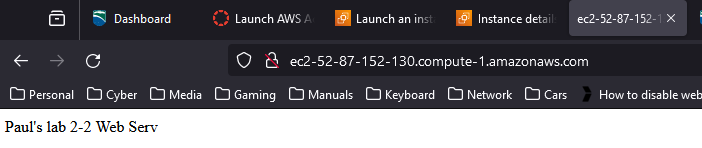
**Submit: Screenshot of successful connection to your custom web page**

<figure><img src="https://1702353884-files.gitbook.io/~/files/v0/b/gitbook-x-prod.appspot.com/o/spaces%2Fg4BXXN6DhMLmwASC6sFj%2Fuploads%2F5KrrOJASuzGahT1JfZNA%2Fimage.png?alt=media&#x26;token=7c8a4cef-b727-4dd5-aff7-ddef96c1b290" alt=""><figcaption></figcaption></figure>

### Creating new user:

```
sudo useradd paul
sudo passwd paul

# Allow non-key authentication ssh
# https://docs.aws.amazon.com/workspaces/latest/adminguide/connect-to-linux-workspaces-with-ssh.html
sudo sed -E -i 's|^#?(PasswordAuthentication)\s.*|\1 yes|' /etc/ssh/sshd_config
sudo sed -i '/^\s*ssh_pwauth:.*$/d' /etc/cloud/cloud.cfg
```

**Submit: Screenshot of successful ssh auth to server from your new user**

<figure><img src="https://1702353884-files.gitbook.io/~/files/v0/b/gitbook-x-prod.appspot.com/o/spaces%2Fg4BXXN6DhMLmwASC6sFj%2Fuploads%2FuykMH6pnX2Uez2SpedYs%2Fimage.png?alt=media&#x26;token=85321029-bfa7-4fee-b883-524908904f9d" alt=""><figcaption></figcaption></figure>

**Submit: Screenshot showing terminated instance**
<figure><img src="https://1702353884-files.gitbook.io/~/files/v0/b/gitbook-x-prod.appspot.com/o/spaces%2Fg4BXXN6DhMLmwASC6sFj%2Fuploads%2Fg8k8T1LtMBjwCrlU9l3W%2Fimage.png?alt=media&#x26;token=9c921b74-b472-45da-9a32-766f244cf716" alt=""><figcaption></figcaption></figure>


---

# Agent Instructions: Querying This Documentation

If you need additional information that is not directly available in this page, you can query the documentation dynamically by asking a question.

Perform an HTTP GET request on the current page URL with the `ask` query parameter:

```
GET https://paul-gleason.gitbook.io/champlain-college-classes/sys-360-cloud-admin/labs/lab-2-2-ec2-web-server.md?ask=<question>
```

The question should be specific, self-contained, and written in natural language.
The response will contain a direct answer to the question and relevant excerpts and sources from the documentation.

Use this mechanism when the answer is not explicitly present in the current page, you need clarification or additional context, or you want to retrieve related documentation sections.